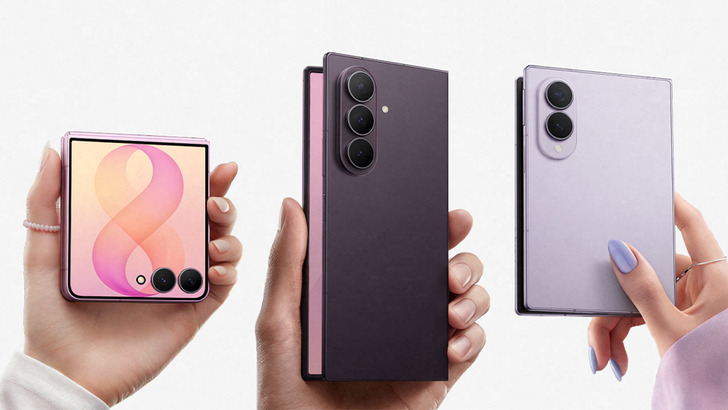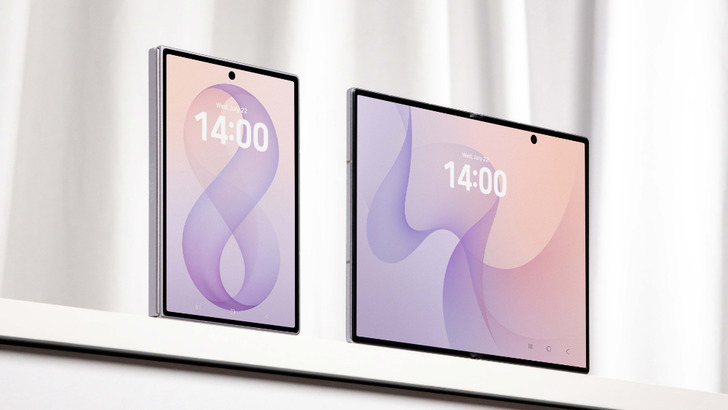
Foldables are sold on the promise of more screen. Samsung’s latest push makes a smaller, more practical argument: knowing when not to unfold may be the real power move.
In a new UK guide, Samsung mobile specialist Kadesh Beckford lays out how Galaxy Z Fold8 and Galaxy Z Fold8 Ultra are meant to be used day to day — not just admired on a spec sheet. The advice is less about gimmicks and more about habits: use the cover screen for quick replies, reserve the main display for the stuff that benefits from room to breathe, and lean on a few tucked-away tools that make the hardware feel a lot smarter.
That approach matters because the latest Fold generation is clearly being split into two personalities. The standard Fold8 looks aimed at people who want a big, flexible screen for entertainment and casual use, while the Ultra version is pitched as the more serious machine for productivity addicts and camera obsessives. Samsung is also leaning hard into the idea that foldables can replace more than one device, a theme that has been building across its recent lineup and even shows up in the company’s broader foldable plans, including the wider-format ideas covered in Samsung’s next trick: wider foldables, a notebook-sized Fold and a resurrected TriFold idea.
Two screens, two jobs
Samsung’s core message is simple: don’t treat the inner display like something you must use all the time. The 5.5-inch cover screen is designed for the quick stuff — messages, notifications, scrolling a feed, checking a route, firing off a reply. Open the phone and the 7.6-inch main display turns into a small tablet, better suited to reading, streaming, gaming or bouncing between tasks.
Kadesh Beckford puts it plainly: the different aspect ratios are the whole point. In portrait, the Fold8’s inner screen feels natural for books and web pages. In landscape, it becomes a proper media slab for YouTube and long-form video. Samsung also points to the Continue Apps on Cover Screen setting, which lets compatible apps stay active when you fold the device shut, so you can move between displays without losing your place.
That may sound minor, but it’s the kind of thing that decides whether a foldable feels clever or merely complicated. It’s also where Samsung seems keen to outgrow the old foldable novelty phase and settle into something more everyday.
The Ultra leans into multitasking
The Fold8 Ultra gets the sharper productivity pitch. Its 8-inch main display supports Multi Window, which means two apps can sit side by side instead of forcing endless app-switching. Think email and calendar, maps and messages, document and browser. It’s the kind of setup that makes the phone feel unusually good at work when you’re away from a laptop.
Samsung clearly wants the Ultra to occupy the same mental space as a mobile workstation, not just a premium phone. That’s a familiar move for the company, which has been steadily adding features that make its top-end devices more PC-like. A similar shift is already showing up elsewhere in the ecosystem too, including features such as your Galaxy S26 can now double as a plug-and-play USB webcam, where Samsung keeps blurring the line between phone and desk gear.
Beckford’s rule of thumb here is refreshingly un-fancy: if you keep flipping back and forth between two apps, use Multi Window instead. The bigger screen is there to save time, not just impress people.
Camera tricks that are easy to miss
Samsung also used the guide to spotlight camera features that many people may never notice on their own. One of the more interesting suggestions is Camera Assistant, a downloadable add-on tucked into the camera settings menu. It unlocks extra controls, including a 24MP capture mode that aims to balance higher resolution with Samsung’s image processing.
There’s also Cover Screen Preview, which is exactly what it sounds like: when you’re using the rear cameras with the phone unfolded, the outer display can show the subject what the shot looks like in real time. That’s a practical little feature, especially for portraits and group photos, because the person in front of the lens can fix their pose before you press the shutter.
Samsung’s camera talk arrives at a moment when foldables are starting to be judged less by their hinge and more by whether they can hold their own against dedicated camera hardware. The company’s own marketing leans into that fight, and third-party comparisons are already testing the idea, including one recent look at Samsung Galaxy Z Fold8 Ultra vs. bulky DSLRs — though Samsung would obviously prefer users to see the phone as a travel-friendly all-rounder rather than a specialist replacement.
Fold8 versus Fold8 Ultra: two different moods
The standard Galaxy Z Fold8 is being framed as the better pick for entertainment. Samsung’s language is all about reading, binge-watching and sharing content, with the foldable form factor doing the heavy lifting. The Ultra, by contrast, gets the serious-camera, serious-multitasking treatment.
That division makes sense. The Ultra packs a 200MP main camera, a 50MP ultra-wide lens and a 10MP 3x optical zoom camera, plus features like Super Steady Horizontal Lock and My FanCam. Samsung is clearly trying to make the Ultra feel like the premium choice for people who want one device to cover almost everything.
The broader trend is familiar across the Android world: manufacturers keep trying to make a single handset do more jobs, whether that means stronger cameras, better multitasking or tighter cross-device tricks. Samsung’s own software strategy has also been getting more flexible, especially as it expands Quick Share and other interoperability features that reduce the friction of switching phones and sharing files between ecosystems.
Moving to Galaxy without the usual headache
For people jumping from another phone, Samsung says setup should be straightforward thanks to One UI 9 and Smart Switch. The pitch is that apps, messages, contacts, settings and more can come across with you, so buying a Fold8 doesn’t mean spending an evening rebuilding your phone from scratch.
That’s an important part of Samsung’s sales argument, especially for a premium device. Fancy hardware is one thing. Making it painless to move in is another.
And that’s really the thread running through Samsung’s whole Fold8 message. The company isn’t just saying foldables have bigger screens. It’s saying they have better habits waiting to be used: keep the small screen for the quick stuff, unfold when it actually helps, split the display when it saves time, and dig a little deeper into the software instead of stopping at the first setup screen.
For a category that spent years proving it could survive the real world, that feels like a more mature sales pitch. Less spectacle, more usefulness. Which, for once, is the better kind of flashy.