VSCO is trying to grow up without losing the charm that made it famous.
The company best known for its moody presets and mobile-first editing app has launched Studio Pro, a new iOS photo editor built for photographers who churn through hundreds of images at a time. It’s available now on iPhone, with a macOS version promised later this year. And this isn’t just a shinier version of the old VSCO app — it’s a clear attempt to move into the professional workflow space long dominated by Adobe.
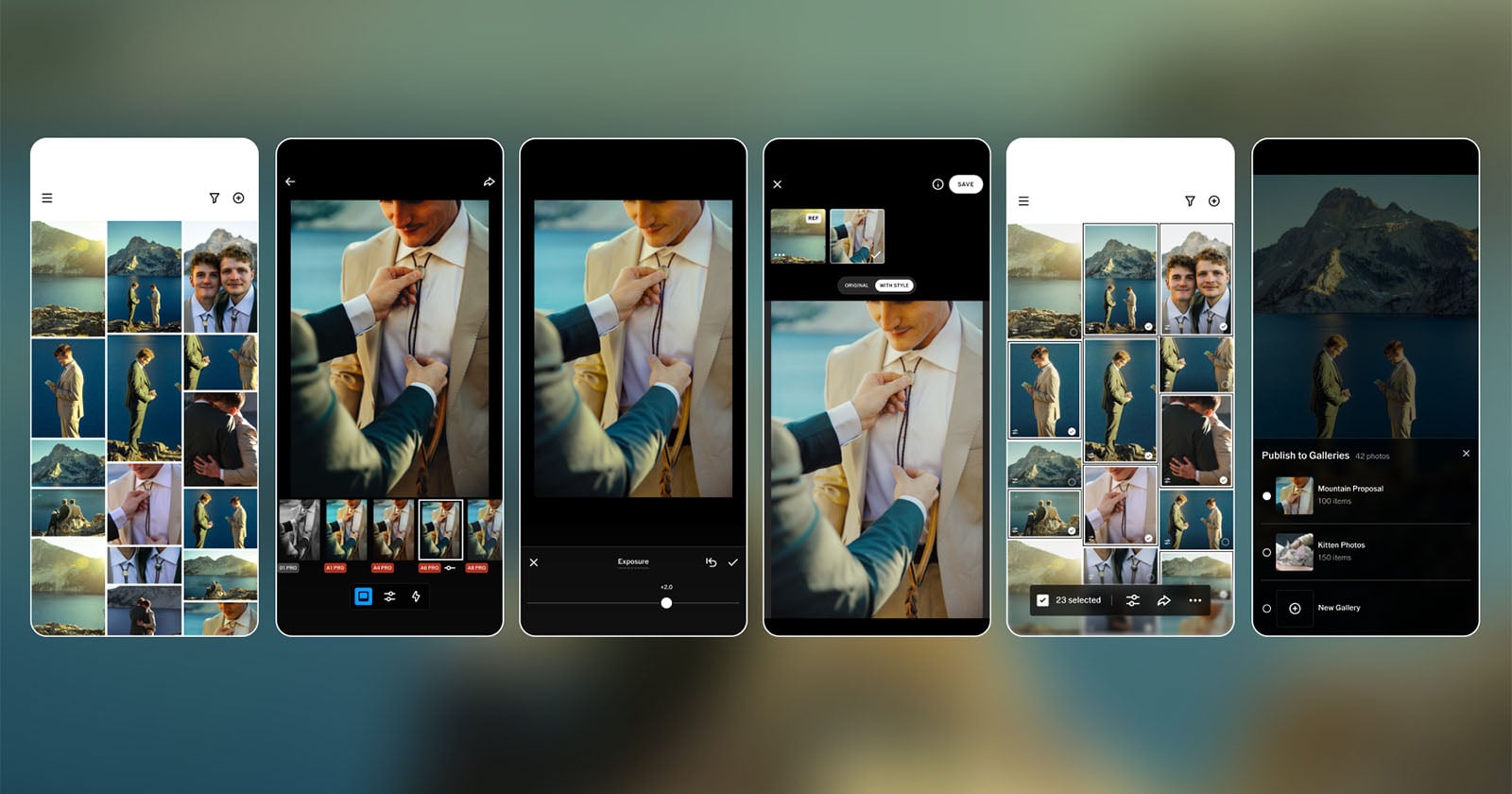
Studio Pro is aimed squarely at wedding, portrait, sports, school, and event photographers. That means the people who don’t need a single perfect edit so much as they need a fast, repeatable one across a giant pile of nearly identical frames. VSCO says the app can batch edit up to 100 photos at once, applying presets or manual adjustments across an entire set in one go. That’s a pretty different proposition from the casual, one-photo-at-a-time editing many people associate with the VSCO name.
The pitch is straightforward: keep the look that made VSCO popular, but remove the friction that slows professionals down.
Familiar looks, built for bigger jobs
At launch, Studio Pro includes more than 200 presets, along with manual controls for exposure, contrast, white balance, tone, sharpening, film grain, and more. A feature called Style Match goes a step further by analyzing a reference image and applying its color, tone, and overall mood to a new batch of photos. If you’ve ever spent too long trying to recreate the exact feel of a previous shoot, you can probably see the appeal.
There’s also a one-tap path to VSCO Galleries, where photographers can deliver finished work to clients. That kind of integration matters more than it sounds. For working photographers, editing is only half the job; moving images from camera to client without turning the process into a spreadsheet marathon is the real prize. VSCO is clearly betting that a cleaner all-in-one workflow can win converts from users tired of juggling separate apps for edits, proofs, delivery, and business admin.
That broader strategy has been building for a while. VSCO has already expanded into client management, contracts, invoicing, planning, and portfolio tools through products like Workspace, Canvas, and Sites. Studio Pro now becomes the editing center of that ecosystem, rather than just another app with nice looks.
For photographers who’ve leaned on iOS 26's little revolutions: Personal Voice, faster workflows and quiet fixes-style workflow tweaks across their devices, the appeal of shaving minutes off repetitive tasks should be obvious. So too is the timing: creative tools are getting more ambitious everywhere, from camera software to mobile editors.
Not Lightroom yet, but clearly aiming that way
VSCO is being candid about the fact that Studio Pro is still early. A number of pro staples are missing for now, including RAW support, direct import from memory cards, culling tools, crops, curves, and advanced export options. Those are the kinds of features that make or break a professional editor, and their absence means the app is not quite ready to replace Lightroom or Capture One for many users.
But the roadmap is doing a lot of the convincing.
VSCO says future versions will add RAW support, star ratings, auto leveling, aspect ratio controls, clarity, bloom, halation, and other advanced tools. In other words, the app is already positioned like a foundation rather than a finished monument. It’s being released before the full toolkit is complete so VSCO can collect feedback and shape the product around real working habits. That’s smart, even if it leaves some obvious gaps at launch.
The desktop version is the other big piece of the puzzle. A mobile editor is useful; a mobile editor that later lands on macOS starts to look much more like a platform. And with pro photographers increasingly bouncing between phone, tablet, and desktop, cross-device continuity is becoming less of a luxury and more of an expectation. That broader shift has been central to products like Apple's stealthy Background Security patch fixes Safari same-origin bypass and other utility-focused updates: users want tools that simply move with them, without drama.
A subscription bundle designed to catch the whole business
VSCO is also making a bigger business play.
The company says Studio Pro will be included in an upcoming VSCO One subscription, a $499-per-year bundle that packs together editing, client galleries, workspace tools, sites, AI features, canvas planning, Capture, and business education resources. The company has framed it as a replacement for the “fragmented” stack many photographers use today — one app for edits, another for galleries, another for invoicing, another for websites.
That pricing puts VSCO One in direct conversation with Adobe Creative Cloud Pro, at least in the broad sense of what professionals are paying for. The difference is that VSCO is trying to sell a photography-specific operating system for a business, not just software for image manipulation.
It’s a bold move, and a risky one. Pro photographers can be loyal to their current workflows, especially if those workflows already include familiar desktop tools and years of muscle memory. But VSCO has one advantage that shouldn’t be dismissed: it already has cultural cachet. Plenty of photographers started with VSCO presets long before they cared about culling, client delivery, or invoice management. Turning that familiarity into a professional ecosystem is a clever bit of brand evolution.
The company’s challenge now is pretty simple, if not easy: prove that Studio Pro can be fast enough for real jobs, powerful enough for demanding users, and polished enough to justify a subscription that’s priced like a serious business tool. If it does, this could be more than just VSCO’s next app. It could become the company’s bid to sit at the center of a photographer’s entire workflow.