Apple is giving Photos one of its most practical iOS 27 makeovers in years — not a redesign, but a pile of features that should actually change how people use the app every day.
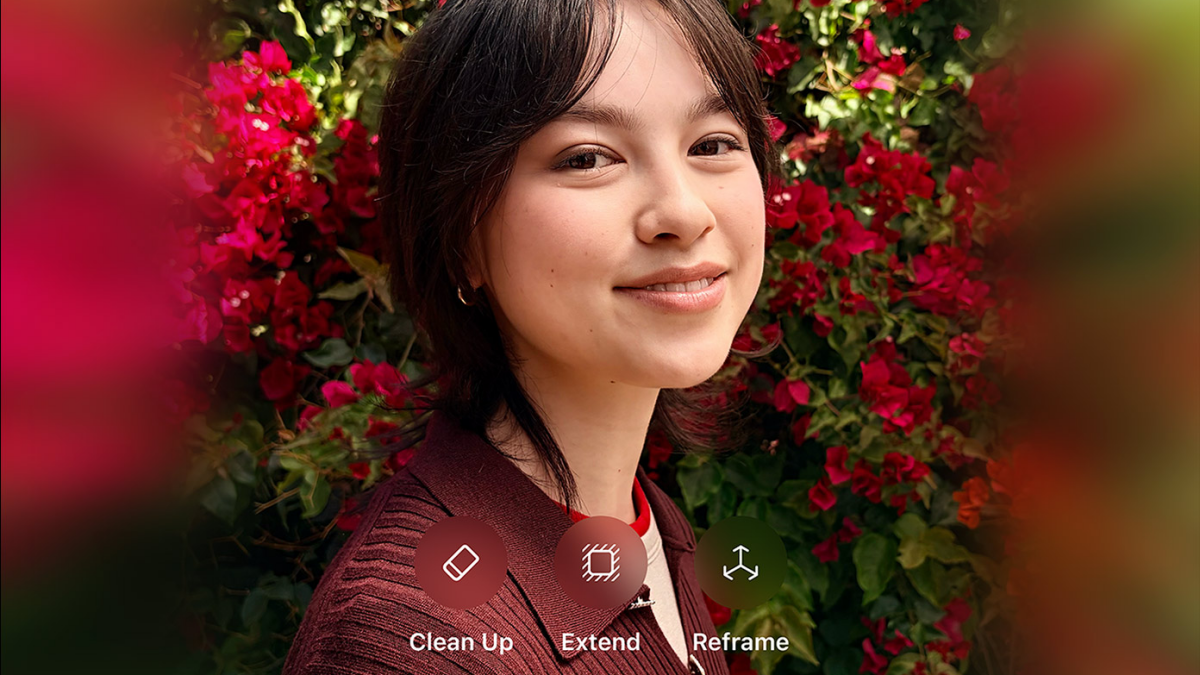
The headline additions are three Apple Intelligence-powered editing tools: Clean Up, Extend, and Reframe. On paper, they sound like the kind of generative AI features every company is racing to ship. In practice, Apple is taking a narrower approach, focusing on fixing real photo problems after the shot instead of turning Photos into a prompt-driven image generator.
That distinction matters. Apple’s own demos and third-party hands-on reports suggest the new tools are aimed at the awkward little compromises we all run into: a stray person in the background, a crop that cuts off too much, a composition that’s almost right but not quite. Clean Up now does a much better job of removing distractions, especially when the scene is complicated. It can lean on Apple’s cloud models when the on-device version isn’t enough, which is a big reason the results look more natural than before.
The other two additions are even more interesting. Reframe lets you shift the perspective of a photo after the fact, almost as if you had moved the camera while shooting. Apple says the feature uses its spatial understanding work from Vision Pro, and that connection makes sense: it’s less about inventing a new image than about reconstructing the scene from a slightly different angle. Extend does something similar for framing, filling in the missing edges when you want a different aspect ratio or simply need a little more room around the subject.
In other words, this isn’t Apple trying to do magic tricks for the sake of it. It’s trying to solve annoying, familiar problems. That’s exactly why the new tools feel more considered than the first wave of Apple Intelligence image features, and it lines up with the broader push toward more useful AI in apps like Photos and Siri. We’ve already seen Apple lean into this more restrained approach in recent reporting on iOS 27’s broader AI strategy and the new Siri work underway in Siri, Redesigned.
There’s also a notable upgrade to organization. Photos in iOS 27 adds new utility collections, including Captured by Me, which filters your library down to only images you took yourself, and Identity Documents, which scans for things like passports and driver’s licenses. Apple is also adding keyword tags alongside captions, giving users one more way to sort through large libraries without relying entirely on albums.
That part may not sound glamorous, but it’s the sort of small improvement that can save time immediately. The same goes for Apple’s vague mention of album organization improvements. It doesn’t say much yet, but the direction is clear: Photos is becoming less of a static camera roll and more of a proper library.
Shared Albums are getting a much-needed overhaul too. Apple is adding full-resolution photo and video sharing, support for Windows and Android users, emoji reactions, easier saving, participant permissions, and even the ability to set albums to expire. That’s a serious update to a feature that has mostly felt frozen in time. It also makes sense if Apple is preparing more living-room-friendly hardware, since shared family albums are a natural fit for devices like the company’s rumored HomePad-style product.
Then there’s slideshow support, which is also getting more flexible. Users will be able to customize transitions, set timings for the full slideshow and individual photos, and save a slideshow as a video with a single tap. That’s the kind of feature you won’t think about until you need it — and then wonder why it wasn’t there years ago.
Apple hasn’t said much about the underlying mechanics, but the pattern across these features is easy to spot. The company is pairing on-device intelligence with cloud-based models where needed, and it’s trying to keep the results tied tightly to familiar workflows. That’s a different mood from the more experimental image tools elsewhere in the industry, and it’s probably why Apple’s approach to generative editing feels more restrained — and more believable.
It also helps that Apple has been careful about labeling AI-edited images and adding metadata to generative edits, a point MacStories highlighted in its coverage of the WWDC interview with Apple’s camera and Photos team. That’s not flashy, but it’s the sort of detail that matters if AI tools are going to become a normal part of photo editing instead of a novelty.
For now, iOS 27 doesn’t appear to be changing the Photos app’s design in any dramatic way. If you were hoping for a total reset, this isn’t that. But if you’ve ever tried to rescue a badly framed picture, clean up a cluttered shot, or make family photos easier to share across devices, Apple’s new package looks a lot more useful than the usual annual software-feature parade.